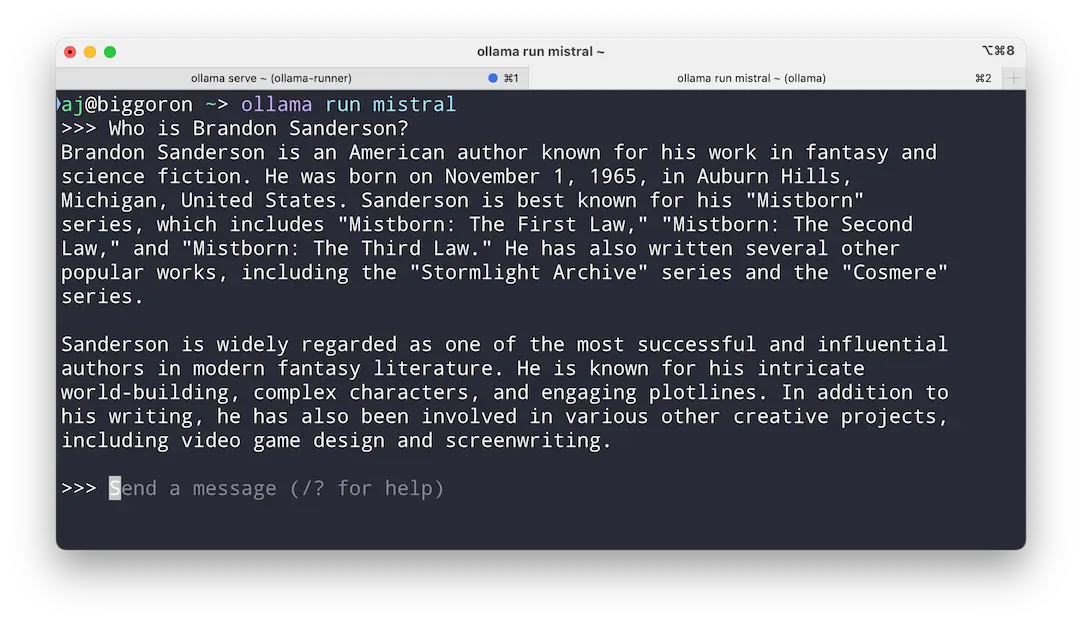
Want to harness the power of AI language models without sending your data to the cloud—or paying a dime? Meet Ollama, a free, open-source gem that lets you run heavy-hitters like Llama 3.3, Mistral, and Gemma 2 right on your Mac. It’s lightweight, straightforward, and built for local action—install it, pick a model, and start chatting or experimenting, all while keeping your privacy intact. Whether you’re a developer tinkering with APIs, a researcher testing prompts, or just an AI curious soul, Ollama hands you the keys to models like Phi-4 and DeepSeek-R1 with a few clicks. Cross-platform for Mac, Windows, and Linux, and backed by a buzzing GitHub community, it’s the no-fuss way to bring cutting-edge AI to your desktop—fast, free, and fully yours.
Why You’ll Love It
- Local Power: Run LLMs on your Mac, no internet needed.
- Model Mix: Choose from Llama, Mistral, Gemma, and more.
- Easy Swap: Switch models without breaking a sweat.
- Everywhere: Works on Mac, Windows, or Linux.
- Privacy Win: Keeps your data right where it belongs.
What It Offers
- Model Menu: Runs Llama 3.3, DeepSeek-R1, Phi-4, and others.
- Light & Lean: Uses minimal resources for smooth performance.
- Simple Setup: Installs fast, runs via command line or API.
- Dev Friendly: Ties into your projects with API options.
- Open & Alive: Free, community-driven, and regularly updated.
Perfect For
- Devs: Test AI in your local sandbox.
- Researchers: Play with models privately.
- Enthusiasts: Explore LLMs without the cloud.
- Privacy buffs: Keep AI off the grid.
Get Started
- Download: Grab it free from Ollama.
- Install: Follow the quick setup for your Mac.
- Run: Pick a model and fire it up locally.
- Experiment: Chat, code, or tweak to your heart’s content.
System Requirements
- macOS 11 (Big Sur) or higher
- 8GB RAM minimum (16GB recommended for bigger models)
- Works on Intel and Apple Silicon Macs
- Also on Windows, Linux
Full Setup Guide
For a full Ollama + Open WebUI Docker walkthrough, read: Ollama Docker Install.